Preeti font is the “Times New Roman” of Nepal—the ultimate legacy standard for typing in Devanagari. Created by Ajay Mishra in 1993, it remains the backbone of government offices, law firms, and the Public Service Commission (Loksewa Ayog) even in 2026.
Here is a comprehensive guide on how to download, install, and master the Preeti font on your system.
1. Where to Download Preeti Font
Since Preeti is a third-party font, it does not come pre-installed on Windows or macOS. You can download the .ttf (TrueType Font) file from several reputable Nepali platforms:
- Portals: you can download the Preeti font from Hemantakc.com.np
- Microsoft Store: You can also find “All Nepali Fonts” packages that include Preeti.
- Direct Link: Look for a file named
PREETI.TTF. It is usually a small file (around 40–50 KB).
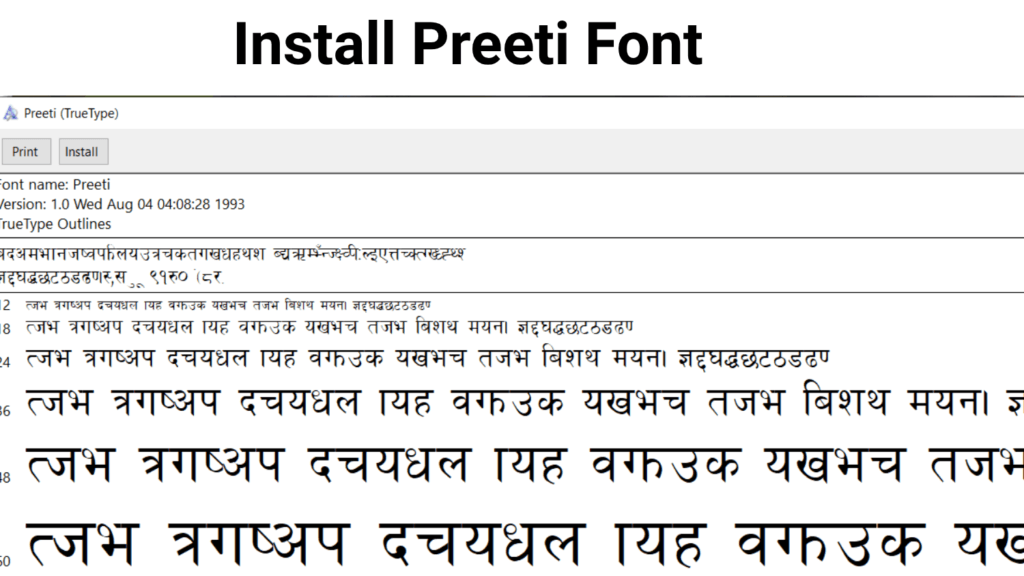
2. How to Install Preeti Font
On Windows (10/11)
- Locate the downloaded
PREETI.TTFfile in your Downloads folder. - Right-click the file and select Install (or “Install for all users”).
- Alternatively, you can drag and drop the file into
C:\Windows\Fonts. - Restart any open applications (like Microsoft Word) to see the font in your list.
On macOS
- Double-click the downloaded font file.
- The Font Book application will open with a preview of the font.
- Click Install Font at the bottom of the window.
3. How to Use Preeti Font
Once installed, using Preeti is as simple as switching your font style, but there is a catch: it uses a non-Unicode layout.
- Open Microsoft Word (or any text editor).
- In the font dropdown menu, search for and select Preeti.
- Start typing. Note that the keys do not match the English phonetic sound. For example, typing “s” on your keyboard will produce “क”.
The Preeti Keyboard Mapping
To type effectively, you must learn the mapping. Here are the most common keys:
| English Key | Preeti Character |
| s | क |
| v | ख |
| u | ग |
| 3 | घ |
| r | च |
| f | ा (Aakar) |
| j | व |
| k | म |
4. Special Characters & Alt Codes
Many Nepali conjuncts (joint letters) and symbols require Alt Codes. To use these, hold the Alt key and type the four-digit number on your Numpad:
- Alt + 0170: ª (Used for certain half-letters)
- Alt + 0163: £ (Used for specific symbols)
- Alt + 0197: Å
- Alt + 0230: æ
5. Important: Preeti vs. Unicode
It is crucial to understand the difference between the two systems used in Nepal:
- Preeti (Legacy): It is “visual.” If you send a Preeti document to someone who doesn’t have the font installed, they will only see random English letters (gibberish). It is not searchable on Google.
- Unicode (Modern): Standardized. It works on Facebook, emails, and mobile phones without needing any extra font installation.
Pro Tip: If you have typed something in Preeti and need to post it on Facebook, use an online Preeti to Unicode Converter from Hemantakc.com.np. Simply paste your Preeti text, and it will give you the universal Nepali text.
6. Troubleshooting Common Issues
- Font not showing in Word: Ensure you didn’t just copy the file, but actually installed it. Restart your PC if it still doesn’t appear.
- Question Marks or Boxes: This usually happens when you try to view a Preeti document in a web browser. Browsers prefer Unicode. Use a converter to read the text.
- Typing in Photoshop/CapCut: Some modern design tools struggle with legacy fonts. If the characters look “broken,” try typing the text in a Word document first and then copying it over, or use the “Unicode” version of the font if available.
Download Preeti Font
Click the Button below to download the Preeti font to your computer.
Summary for 2026
While Unicode is the future for the web and mobile, Preeti remains the king for physical printing and government work in Nepal. Mastering it is still a highly valued skill for any office-based job in the country.
FAQ
Why does my Preeti text look like “gibberish” when I send it via email?
Preeti is a “legacy” font. If the recipient doesn’t have the font installed on their device, their system will display the default English characters instead.
Can I use the Preeti font on my Android or iPhone?
Mobile OS systems generally don’t support custom .ttf font installations for typing. Recommend using Unicode for mobile messaging instead.
Why doesn’t Preeti font work in Canva or CapCut?
Many modern web-based design tools only support Unicode. Suggest using a “Unicode to Preeti” converter or uploading the .ttf file manually if the platform allows it.
What is the difference between Preeti and Kantipur fonts?
They are both legacy fonts with the same keyboard layout; the only difference is the thickness and “look” of the characters. They are cross-compatible.